
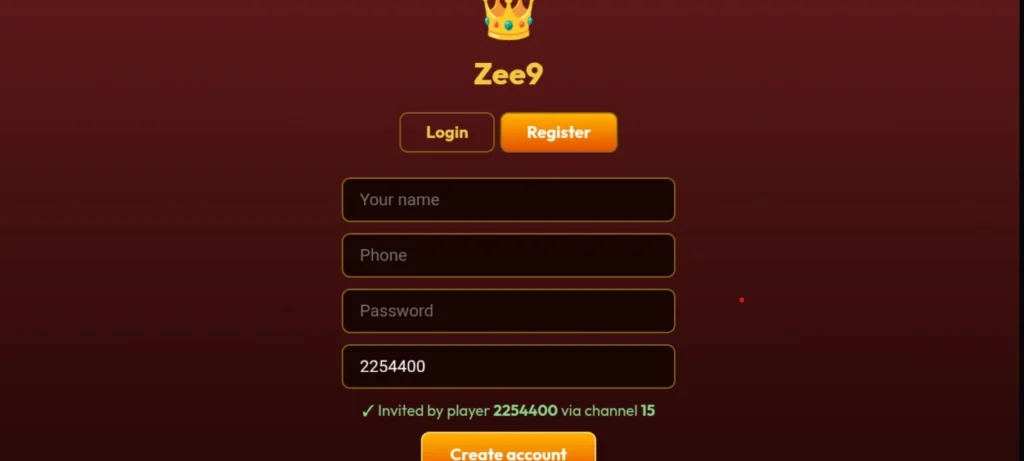
Creating a Zee9 Game account in Pakistan is simple and usually takes only a few minutes. New users can register through the Zee9 app or its website by entering the required account details. The exact registration fields can change with different versions, so always follow the instructions shown on the official platform.
What You Need Before Registration
Before creating your Zee9 Game account, keep these things ready:
- A working mobile phone
- A valid mobile number
- A strong password
- A stable internet connection
- The latest Zee9 Game app or official website
If the platform asks for additional verification, complete it only through the official Zee9 interface.
How to Register on Zee9 Game in Pakistan
Follow these simple steps to create your account.
Open Zee9 Game
Open the latest Zee9 Game app on your Android phone. You can also use the official website if registration is available there.
Tap the Register Button
On the welcome or login screen, look for the Register, Sign Up, or Create Account button.
Tap it to open the registration form.
Enter Your Mobile Number
Enter your active Pakistani mobile number in the required field.
Make sure the number is correct because it may be used for account verification or recovery.
Create a Strong Password
Choose a password that is difficult for others to guess.
For better security, use a combination of letters, numbers, and symbols. Never share your password with another person.
Add a Referral Code
If you have a valid Zee9 referral or invitation code, enter it in the referral field.
If the field is optional, you can leave it empty.
Complete Verification
If Zee9 asks you to verify your mobile number or complete another security check, follow the instructions displayed on the screen.
Do not share verification codes with strangers or unofficial agents.
Create Your Account
Check your information carefully and tap Register, Sign Up, or the relevant button.
If your details are accepted, your Zee9 Game account should be created.
Log In
After registration, return to the login screen if necessary.
Enter your registered details and tap Login to access your account. The current Zee9 guide also describes registration and login as separate steps for new and existing users.
How to Make Your Zee9 Account Secure
After registration, follow these basic security tips:
- Use a unique password.
- Never share your password or verification code.
- Avoid suspicious Zee9 links sent through unknown sources.
- Keep your app updated.
- Check your account details regularly.
- Use only trusted payment options if you choose to make a transaction.
Is Zee9 Game Registration Free?
The registration process is presented as free on Zee9’s current information pages. However, creating an account is different from depositing money or playing games that involve real-money risk. Bonuses, payment options, and other features can change, so check the current terms before using them.
Common Zee9 Registration Problems
Registration Button Is Not Working
Check your internet connection and make sure you are using the latest version of the app or website.
Mobile Number Is Not Accepted
Check that you entered the correct number and country format. If the problem continues, use the platform’s official support channel.
Verification Code Does Not Arrive
Wait a few moments and check your mobile network. Avoid repeatedly requesting codes in a short period.
Password Does Not Work
Check for typing mistakes and make sure you are entering the same password you created during registration.
Frequently Asked Questions
Is Zee9 Game registration free?
Yes, account registration is described as free. Paid gaming activities and deposits are separate, so check the current terms before spending money.
Can I register using my Pakistani mobile number?
The current Zee9 information describes mobile-number-based registration, although the exact fields may vary by app version.
Do I need a referral code?
A referral code may be available as an optional field. You can enter one if you have a valid code.
What should I do if I cannot register?
Check your internet connection, verify your information, update the app, and contact Zee9 through its official support channel if the problem remains.
Final Words
Creating a Zee9 Game account in Pakistan is straightforward. Open the official Zee9 platform, select Register, enter your required details, complete verification if requested, and then log in. Always protect your account information and check the latest platform rules before using any paid gaming or reward features.